Introduction
Flows orchestrate the modules: they define when and under which conditions a module configuration is applied. The actions triggered from the interface are also defined by flows.
Any provides a graphical flow builder to draw the flows. Two objects are available to build them: conditions and actions.
A "no action" option is available in every flow. It does nothing, and makes explicit a branch that deliberately leads to no processing.
Conditions
A condition defines when an action must be performed. The offered conditions depend on the flow: not all of them are available everywhere.
Metadata
Sources: the sources available to define where the metadata comes from are:
- Room
- Folder
- Form
- Content
- Room + Folder + Template
Available conditions:
- Metadata is equal to at least one of the values: if the selected metadata carries several values, the condition is true as soon as one of them matches.
- Metadata is not equal to any of the values: if the selected metadata carries several values, the condition is true only if none matches.
- Metadata is empty
- Metadata is not empty
- Has aspect: tests whether the object carries the selected aspect.
- Does not have aspect: tests whether the object does not carry the selected aspect.
User
- User is a member of at least one of the groups: tests whether the current user is a member of at least one of the specified groups.
- User is not a member of any of the groups: tests whether the current user is not a member of any of the specified groups.
- User has at least one of the roles: tests whether the current user has at least one of the specified roles.
- User does not have any of the roles: tests whether the current user does not have any of the specified roles.
- Metadata is equal to at least one of the values: tests whether the metadata is equal to at least one of the values.
- Metadata is not equal to any of the values: tests whether the metadata is not equal to any of the values.
Location
These two conditions are not symmetrical: they do not cover the same object. The first tests where the user is, the second where the content is. A condition and its apparent negation are therefore not interchangeable.
- User is in room: tests whether the user is browsing one of the specified rooms.
- Is not in room: tests whether the content is not in any of the specified rooms.
Content
- Imported file has at least one of the extensions
- Imported file does not have any of the extensions
- Has at least one of the formats: the imported file has at least one of the specified formats.
- Does not have any of the formats: the imported file does not have any of the specified formats.
- The file size is less than: tests the size of the imported file.
- External source name is equal to at least one of the values: tests whether the synchronization message comes from a source whose value is equal to at least one of the values.
- External source name does not equal any of the values: tests whether the synchronization message comes from a source whose value is not equal to any of the values.
- The message is a package
- The message is not a package
- The message is an operation of type: tests whether the synchronization message is an operation of the type in the values list.
Advanced
JavaScript: condition based on contextual data.
Value: enter the predicate.
room.<metadata>: room metadatacontent.<metadata>: content metadatadialog.<metadata>: dialog box metadata
For instance: room.core.name == 'my_room'
GQL Predicate: condition matching the current content. Refer to the GQL reference guide for more details.
Value: enter the predicate.
For instance: standard.status = 'Draft' or standard.status = 'Approved'
Outputs and chaining
A condition has three outputs:
- True: the condition is met
- False: the condition is not met
- Default value: every chained condition is false
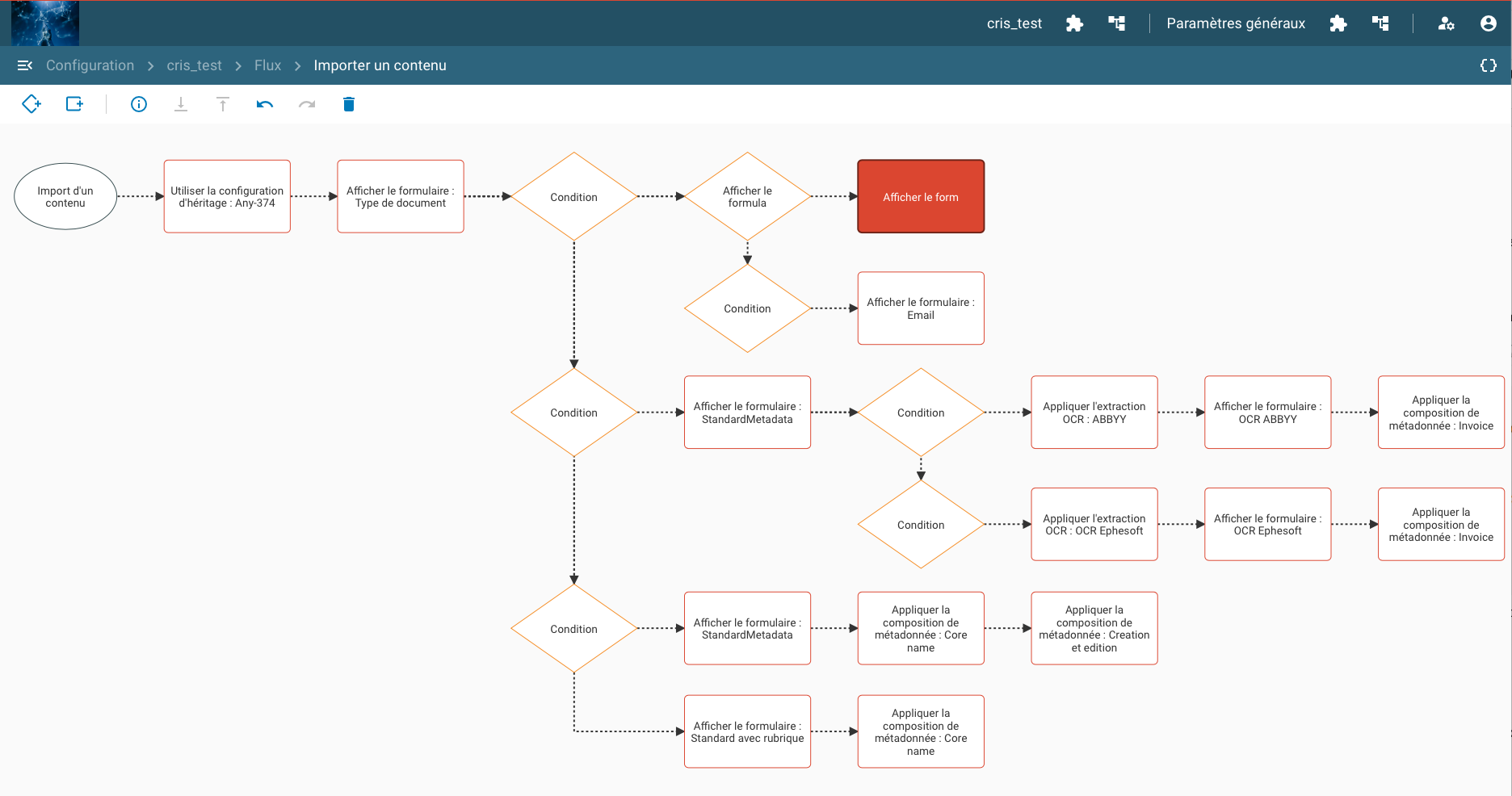
Conditions can be chained.
Example of a flow with chained conditions and a default output:
Actions
An action can be applied directly or can follow a condition, in which case the action is applied only if the conditions are true.
An action has two parameters:
- Value: module configuration applied, chosen in the drop-down list.
- Description: role of the action in this specific flow. Since the same module often serves in several places, this text is what recalls why it is there.
The list of the modules that can be used in this flow can be displayed with the tree icon on the right of the top bar of the flow configuration.
Actions can also be chained, as in the following example: